RabbitMQ 强大之处在于 Exchange(交换机)提供了多种路由策略,组合出 6 种经典通信模式。本文用图 + 场景 + 代码,把每种模式讲透。
环境准备:RabbitMQ 3.x + .NET 8
RabbitMQ.ClientNuGet 包。
一、模式总览表
| 模式名 | Exchange 类型 | 路由依据 | 典型场景 |
|---|---|---|---|
| 1. Simple Queue | 默认(nameless direct) | 队列名完全匹配 | Hello World、入门 |
| 2. Work Queues | 默认 direct | 队列名,多消费者竞争 | 任务分发、后台作业 |
| 3. Publish/Subscribe | fanout | 无视 key,全广播 | 事件通知、WebSocket 推送 |
| 4. Routing | direct | routing_key 精确匹配 | 按日志级别分发 |
| 5. Topics | topic | routing_key 通配符匹配 | 多维度分类订阅 |
| 6. RPC | direct | reply_to + correlation_id | 同步远程调用 |
| (补充)Headers | headers | 消息头字典匹配 | 结构化路由(少用) |
二、模式 2:Work Queues(竞争消费者)
也叫 Task Queues,最常用的生产级模式之一。
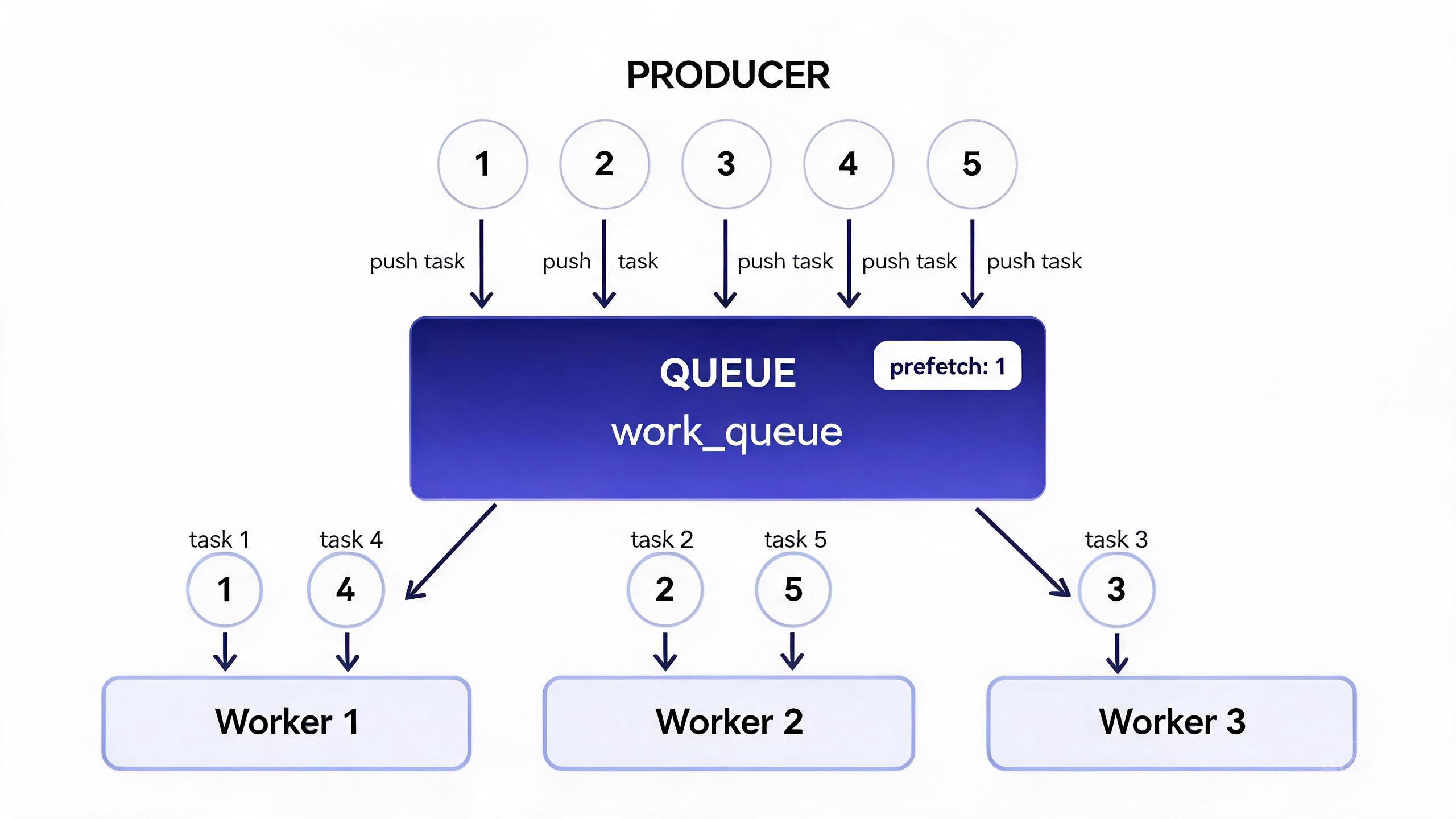
核心逻辑
- 生产者把任务 1~5 逐个丢进同一个
work_queue - 3 个 Worker 消费者竞争抢消息,默认 RabbitMQ 采用轮询(Round-Robin)分发
- 关键参数
prefetch=1:不要一次把队列消息全推给某个消费者,谁有空谁接下一个(避免忙的更忙、闲的更闲)
C# 核心代码
// ===== 生产者:发送 10 个耗时任务 =====
var factory = new ConnectionFactory { HostName = "localhost" };
using var conn = factory.CreateConnection();
using var ch = conn.CreateModel();

// 声明队列(durable: true 持久化,防止宕机丢任务)
ch.QueueDeclare(queue: "work_queue", durable: true, exclusive: false, autoDelete: false);

for (int i = 1; i <= 10; i++)
{
    string msg = $"Task-{i}:耗时{i}秒";
    var body = Encoding.UTF8.GetBytes(msg);
    // 消息标记持久化
    var props = ch.CreateBasicProperties();
    props.Persistent = true;
    ch.BasicPublish(exchange: "", routingKey: "work_queue", basicProperties: props, body: body);
    Console.WriteLine($"[Producer] 发送 {msg}");
}
// ===== 消费者(每个 Worker 启动一个) =====
ch.BasicQos(prefetchSize: 0, prefetchCount: 1, global: false); // ★公平分发
var consumer = new EventingBasicConsumer(ch);
consumer.Received += (model, ea) =>
{
    var msg = Encoding.UTF8.GetString(ea.Body.ToArray());
    Console.WriteLine($"[Worker{Thread.CurrentThread.ManagedThreadId}] 处理 {msg}");
    // 模拟耗时
    int sec = int.Parse(Regex.Match(msg, @"耗时(\d+)秒").Groups[1].Value);
    Thread.Sleep(sec * 1000);
    // ★ 手动 ACK(否则消费者崩了消息丢失)
    ch.BasicAck(deliveryTag: ea.DeliveryTag, multiple: false);
};
ch.BasicConsume(queue: "work_queue", autoAck: false, consumer: consumer); // autoAck 必须 false
⚠️ 两个坑:
autoAck=true→ 消息一推出去就删,消费者崩了消息丢失- 不设
prefetch=1→ 奇数任务全给 Worker1、偶数全给 Worker2,快的闲死、慢的累死
三、模式 3:Publish/Subscribe(Fanout 广播)
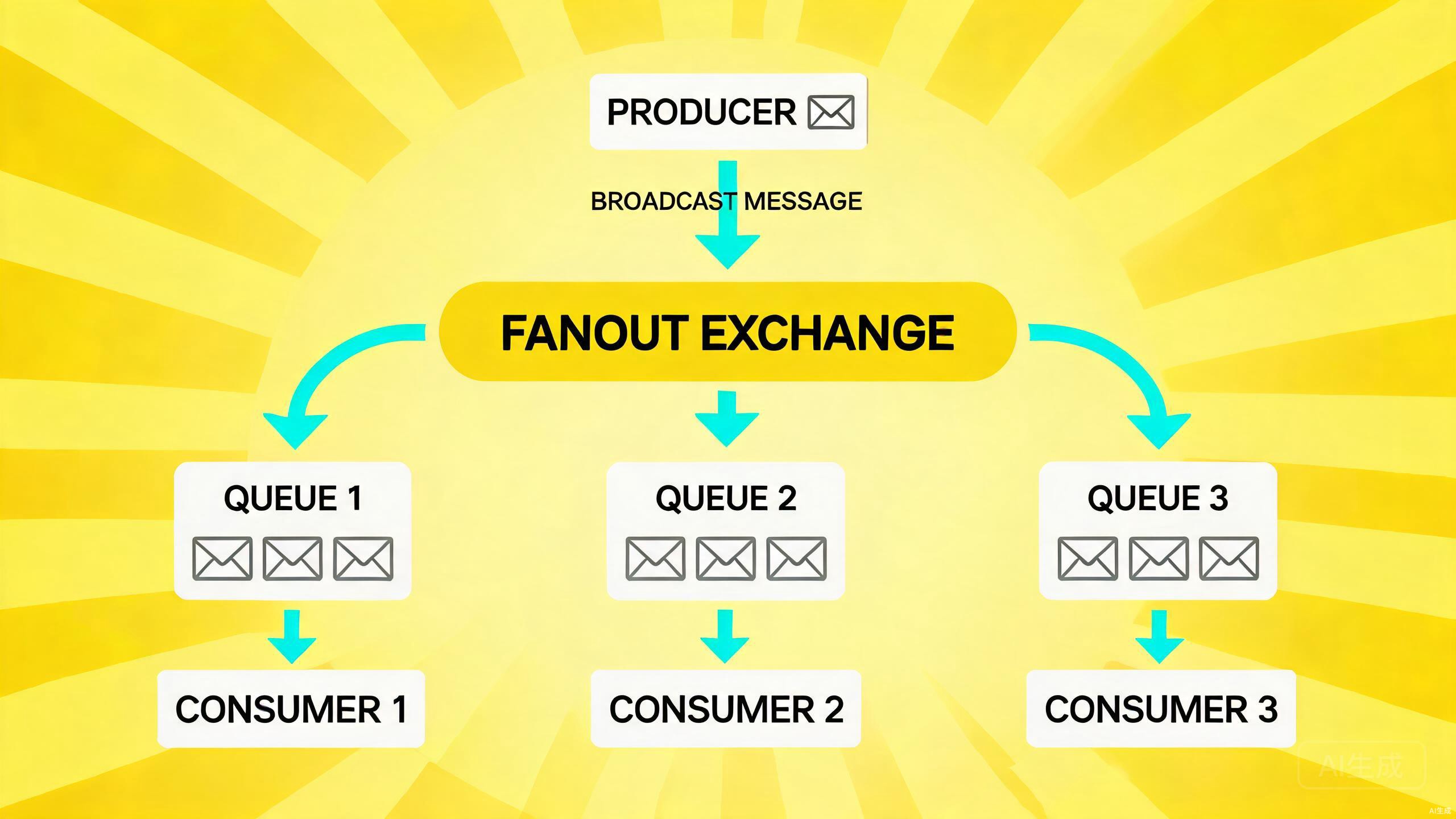
核心逻辑
- 一条消息进来,复制 N 份,所有绑定的队列都各拿一份
- Fanout Exchange 完全忽略 routing_key,只要绑定了就广播
- 典型场景:用户下单后需要发短信 + 发邮件 + 刷新缓存 + 发 WebSocket,四套独立逻辑
C# 核心代码
// 声明 Fanout 交换机
ch.ExchangeDeclare(exchange: "order_events", type: ExchangeType.Fanout, durable: true);

// 队列 A:短信消费者
ch.QueueDeclare("queue_sms", durable: true, exclusive: false, autoDelete: false);
ch.QueueBind(queue: "queue_sms", exchange: "order_events", routingKey: ""); // key 留空

// 队列 B:邮件消费者
ch.QueueDeclare("queue_email", durable: true, exclusive: false, autoDelete: false);
ch.QueueBind(queue: "queue_email", exchange: "order_events", routingKey: "");

// 发布 1 条 → 两个队列都会收到副本
byte[] body = Encoding.UTF8.GetBytes($"OrderCreated: OrderId=1001");
ch.BasicPublish(exchange: "order_events", routingKey: "", body: body);
四、模式 4:Routing(Direct 精确路由)
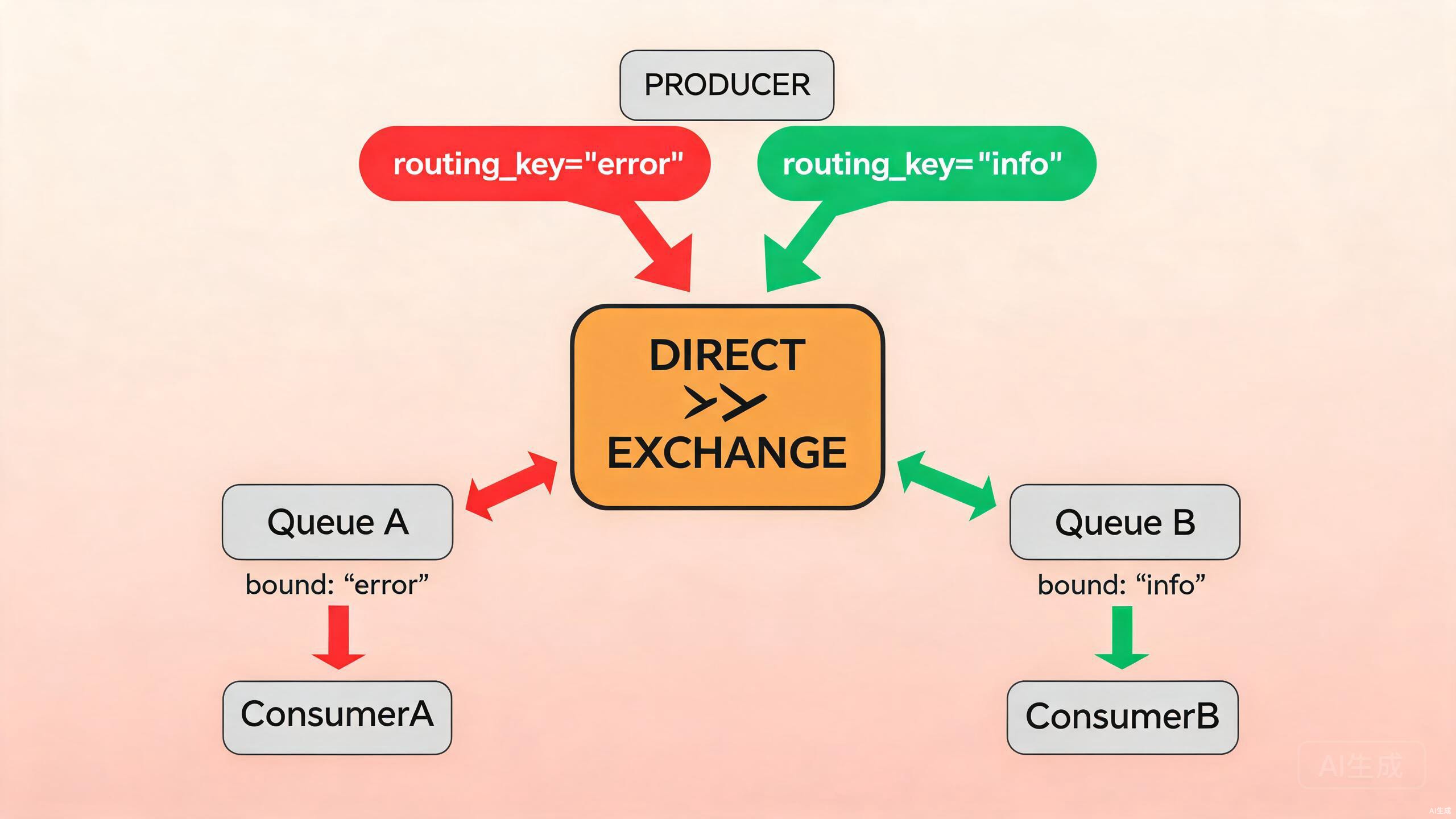
核心逻辑
- routing_key 必须完全相等才会投递
- 如图:
routing_key="error"→ 只投给绑定error的 QueueA;routing_key="info"→ 只投给 QueueB
典型场景
日志系统:ERROR 级日志只发到告警队列,INFO 级只发到审计队列,互不干扰。
ch.ExchangeDeclare("log_direct", ExchangeType.Direct, durable: true);
ch.QueueDeclare("queue_alarm", durable: true);
ch.QueueDeclare("queue_audit", durable: true);

ch.QueueBind("queue_alarm", "log_direct", routingKey: "error");
ch.QueueBind("queue_audit", "log_direct", routingKey: "info");
ch.QueueBind("queue_audit", "log_direct", routingKey: "warn"); // 一个队列可以绑多个 key

// 投递
ch.BasicPublish("log_direct", routingKey: "error", body: Encoding.UTF8.GetBytes("DB 挂了")); // 到 alarm
ch.BasicPublish("log_direct", routingKey: "info",  body: Encoding.UTF8.GetBytes("用户登录")); // 到 audit
五、模式 5:Topics(通配符路由 ⭐⭐⭐)
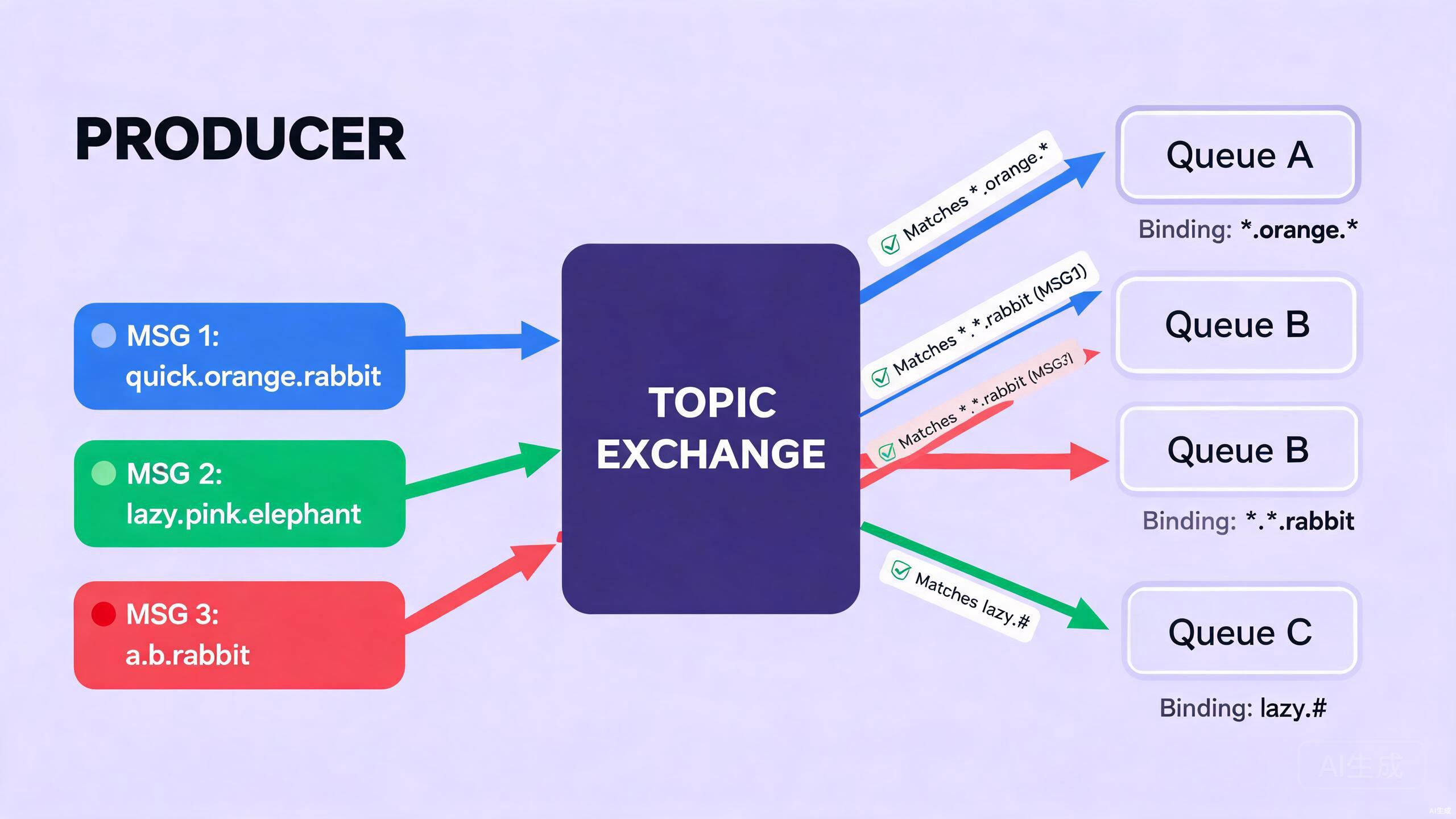
核心逻辑
routing_key 用 . 分段,Binding key 支持两个通配符:
| 通配符 | 含义 |
|---|---|
* |
匹配任意 1 个词段 |
# |
匹配0 个或多个词段 |
以图中 3 个队列为例:
| 发送消息 routing_key | QueueA *.orange.* |
QueueB *.*.rabbit |
QueueC lazy.# |
|---|---|---|---|
quick.orange.rabbit |
✅(三段,中间=orange) | ✅ | ❌ |
lazy.pink.elephant |
❌ | ❌ | ✅(lazy 开头,后面多少都可以) |
a.b.rabbit |
❌ | ✅ | ❌ |
典型场景
- 新闻推送:
cn.sports.football/us.economy.*/cn.# - 多租户设备上报:
tenantA.device1.temp/tenantB.#
六、模式 6:RPC(请求-响应模式)
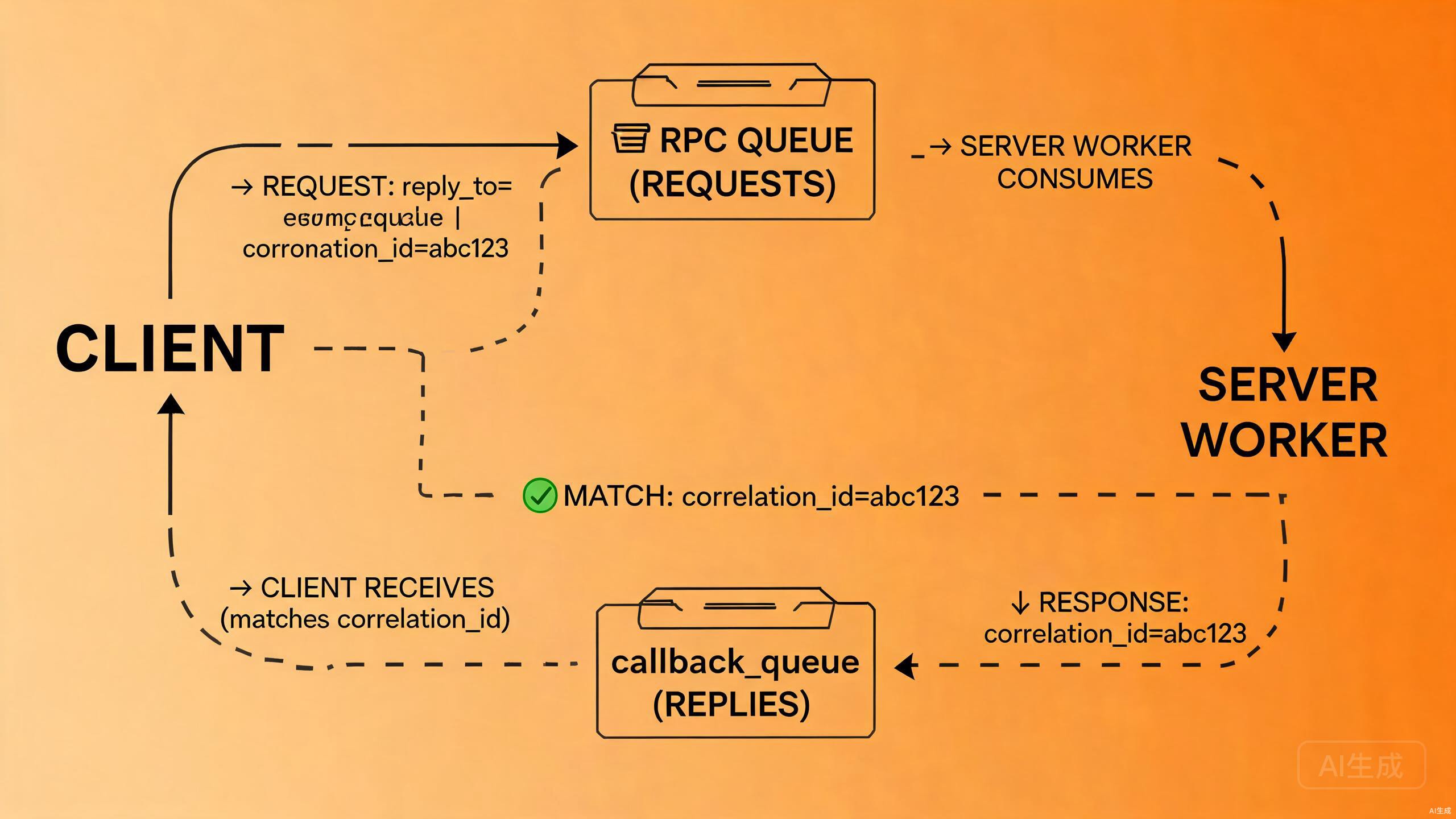
核心逻辑
MQ 本身是异步的,但业务有时需要"发送任务 + 拿到执行结果"。做法:
- Client 发请求时设置两个 AMQP 属性:
reply_to= 回调队列名(告诉 Server 结果回哪)correlation_id= 唯一 GUID(把请求和响应对应起来)- Server 从 RPC Queue 消费请求,处理完后 Publish 到
reply_to指定的回调队列 - Client 从回调队列取消息,用 correlation_id 匹配,就知道这是哪次请求的结果
C# 核心代码(Server 端)
consumer.Received += (model, ea) =>
{
    string request = Encoding.UTF8.GetString(ea.Body.ToArray());
    // 业务:例如斐波那契计算
    int n = int.Parse(request);
    string response = Fib(n).ToString();

    // 结果发送到 reply_to 队列,带回 correlation_id
    var replyProps = ch.CreateBasicProperties();
    replyProps.CorrelationId = ea.BasicProperties.CorrelationId;
    ch.BasicPublish(
        exchange: "",
        routingKey: ea.BasicProperties.ReplyTo,
        basicProperties: replyProps,
        body: Encoding.UTF8.GetBytes(response)
    );
    ch.BasicAck(ea.DeliveryTag, false);
};
💡 RPC 模式要慎用:能用 MQ 就尽量异步,不要滥用把 MQ 当 HTTP 用。
七、补充:Headers Exchange(基于字典匹配)
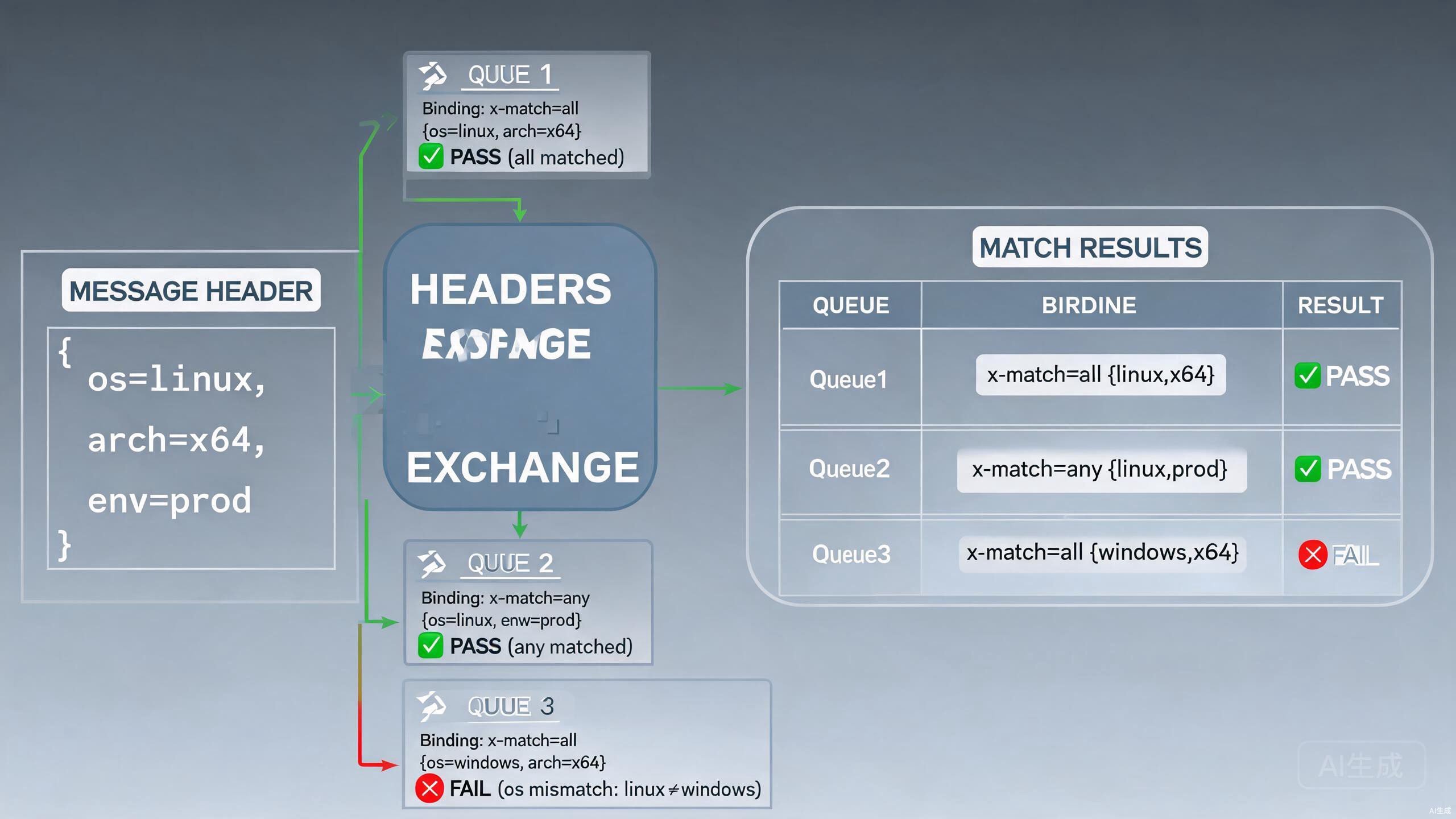
核心逻辑
- 完全不用 routing_key,改为用消息的
Headers字典匹配 - 绑定参数
x-match: x-match=all→ 所有键值都匹配才投递(AND)x-match=any→ 任意一个键值匹配就投递(OR)
代码示例
ch.ExchangeDeclare("log_headers", ExchangeType.Headers, durable: true);
ch.QueueDeclare("queue_linux_x64", durable: true);

// 绑定时传 headers 参数
var bindArgs = new Dictionary<string, object>
{
    { "x-match", "all" },
    { "os", "linux" },
    { "arch", "x64" }
};
ch.QueueBind("queue_linux_x64", "log_headers", "", bindArgs);

// 发送时在 BasicProperties 写 headers
var props = ch.CreateBasicProperties();
props.Headers = new Dictionary<string, object> { { "os", "linux" }, { "arch", "x64" } };
ch.BasicPublish("log_headers", "", props, body);
实际生产中 Headers 用得很少,路由能力强但性能比 Direct/Topic 差,调试也更复杂。
八、选型速查表
| 你的需求 | 选哪种模式 |
|---|---|
| 最简单的一发一收 | Simple Queue |
| 耗时任务分给多个 Worker 做 | Work Queue + prefetch=1 |
| 一个事件多个系统都要收到 | Fanout |
| 按精确标签路由(error/warn/info) | Direct |
| 按多维度规则订阅(新闻、多租户) | Topic |
| 需要同步拿到结果 | RPC |
| 复杂条件匹配(基于头字典) | Headers |
下一篇我们进入生产级必备知识:RabbitMQ 高级特性——消息确认、持久化、死信队列、延迟 / 优先级队列,让你的 MQ 实现"消息零丢失"。